
LEGO® Play
LEGO System A/SEntertainment
4.5748.00 Reviews
- Version
- 2026.6.3
- Installs
- 10.00M
- Age Rating
- Everyone
Screenshots

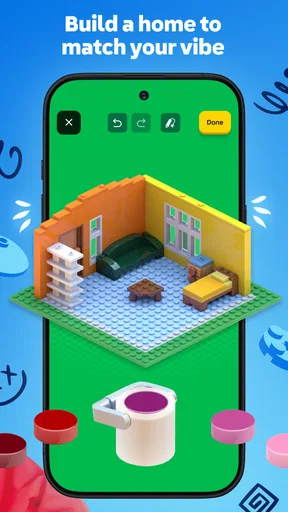
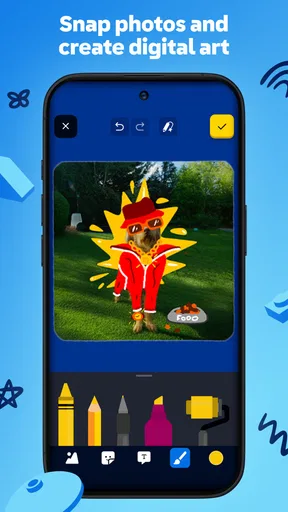

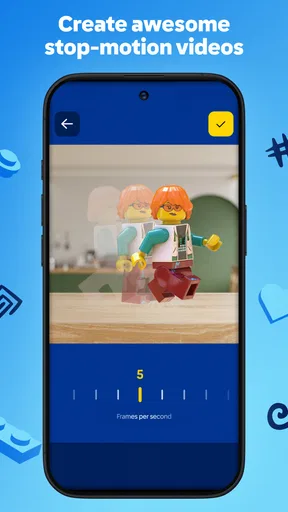

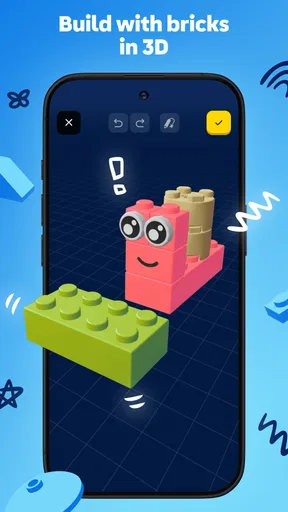
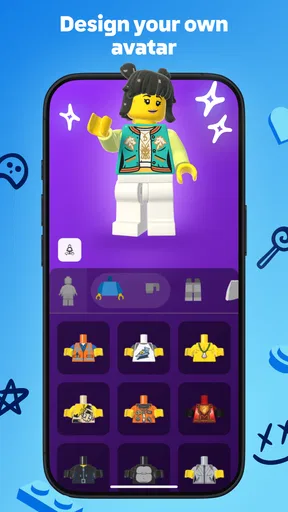
Our Review of LEGO® Play
 Analysis by Appyee
LEGO® Play is the kind of entertainment app I would hand to a child who wants more than a digital shelf of building instructions. It combines creative play, simple animation, and games in one bright space, so the experience can shift from making something to interacting with it. I found that combination more interesting than a single-purpose building app, although it also means the app feels best when a child enjoys moving between different activities rather than focusing on one deep tool.
Created by LEGO System A/S, this free app is aimed at everyone from a content-rating perspective and runs on Android devices using version 7.0 or later. It has reached over ten million installs and holds a 4.5 average from around twenty-two thousand ratings, which gives it a substantial audience without being the main reason I would recommend it. The more important question is whether its mix of creativity and games fits the way your child likes to play.
How the connected experience changes the way LEGO Play feels
The app’s strongest idea is that it treats a phone or tablet as a small playroom rather than just a viewer for LEGO content. I can move from designing to creating, then experiment with animation before switching to a game. That variety makes short sessions easy to start, especially when a child has only a few minutes before dinner or wants something to do while travelling.
At the same time, this is not a replacement for physical bricks, a full animation workstation, or a dedicated game with one carefully developed mechanic. Its appeal comes from the change of pace. A child may enjoy the freedom of making something, then prefer the clearer goal of a game. Another child may find the number of directions distracting and want a more focused creative app instead.
Connectivity matters because a mixed entertainment app often depends on the device being able to reach its current content. I would treat LEGO Play as an experience to prepare before a journey rather than assume every part will behave exactly the same way without a connection. If a child is expecting to open every activity during a flight, in a car with weak reception, or in a waiting room with unreliable service, it is sensible to test the intended activities beforehand.
I also would not describe a loading pause as a defect without considering the situation. On a stable home connection, moving between playful areas feels much less disruptive. On a crowded public network, the same transition can become the moment when a child loses patience. That distinction is useful for parents: the app can be a good travel companion, but it should not be the only activity packed for a long offline stretch.
Creative play works best in short, repeatable sessions
The design side is where the app has the clearest advantage over ordinary video entertainment. Instead of only watching a character or tapping through a fixed story, the child is encouraged to make something and see it behave. That small loop—create, adjust, watch, and try again—can hold attention without requiring a long uninterrupted session.
I especially like this format for children who enjoy telling stories with their builds. A child can use the creative space as a prompt: make a character, give it a simple action, then turn that action into a tiny scene. The result does not need to be polished. The value is in noticing how a small change affects the outcome, which is a more active use of screen time than passively scrolling through clips.
There is a practical limitation, though. A touch screen cannot provide the same tactile feedback as sorting and connecting real bricks. Children who mainly love the physical act of building may lose interest once the novelty of the digital tools fades. I would use the app alongside a real LEGO set, not as a substitute for one.
Why a tablet is usually more comfortable than a phone
Although the app is suitable for mobile use, I found the larger screen context more natural for creative activities. A tablet gives a child more room to see the workspace and controls without constantly covering the scene with a finger. It also makes it easier for an adult to sit beside the child and talk through what is happening.
A phone has a different strength: it is always close at hand. That makes it useful for a quick game in a queue or a short creative experiment while waiting for an appointment. However, the smaller display can make visual details and touch targets feel cramped, particularly when a child is still developing precise control. I would choose the tablet for making and the phone for brief, casual sessions.
That distinction also helps with family routines. On a shared tablet, a parent can set up the app in a common area and remain involved without turning the activity into a formal lesson. On a personal phone, the experience is more private and portable, but it is easier for the session to continue longer than intended. The device, not just the app, shapes how the entertainment fits into the day.
A realistic everyday use case
Imagine a rainy afternoon when a child has already finished a physical build but still wants to play with the idea. I would open the app together, let the child create a digital scene, and encourage a small animation rather than aiming for a complicated project. After that, we could switch to one of the games for a change of pace, then stop while the activity still feels enjoyable.
This works because the app supports several levels of involvement. A child can explore independently, while an adult can offer a creative challenge such as making a character move from one side of a scene to another. The important part is not taking control of the device. Asking why the character should move, what should happen next, or which detail could change keeps the child making decisions.
For a group of siblings, the experience may be less smooth. Two children sharing one screen can disagree about whose idea to use, and the app’s variety does not automatically solve that social problem. In that situation, I would give each child a turn with a clear role—one creates, the other suggests—or use the games as a separate turn-taking activity.
When a connection becomes part of the play session
Network-dependent moments are most noticeable when the app moves from one kind of content to another. A child does not think in terms of network requests; they simply expect the next activity to appear immediately. If it does not, the creative momentum disappears. I recommend opening the app before handing it over, checking that the intended area is ready, and avoiding last-minute setup when the connection is already poor.
This is particularly relevant for parents managing mobile data. A short session at home on a reliable connection is different from repeated use during a commute. I would avoid assuming that every transition has the same data cost or that every activity is equally suitable for a limited plan. If data use matters in your household, use the app mainly on trusted Wi-Fi and keep an eye on the device’s normal data controls.
The same advice applies to battery planning. Creative tools, animation, and games can encourage longer screen use, and a child may not notice that the device is running low. I would charge the tablet before a journey and keep another non-screen activity available. That is not a criticism of LEGO Play specifically; it is a sensible way to prevent a connected entertainment app from becoming a source of frustration at the worst possible moment.
What happens when loading fails or the app stops behaving normally
Everyday recovery is more important than it sounds. If a game or creative area does not open, I would first check the connection, then close and reopen the app rather than repeatedly tapping the same control. If the device is busy or the app has been left open for a long time, restarting the session can be quicker than trying to force the stuck screen forward.
For a child, the best recovery plan is simple: pause, tell an adult, and switch to another activity instead of repeatedly pressing buttons. Parents can also check whether the device meets the Android requirement of version 7.0 or later and whether there is enough general device space for normal app operation. I would not promise that those steps solve every problem, but they cover the ordinary situations that interrupt a short play session.
A failed connection can also reveal an important trade-off in the app’s design. Its variety is a strength when everything is available, but it means a problem in one transition can affect the feeling of the whole experience. A single-purpose offline activity may be less exciting, yet more predictable. If reliability is the top priority for a long trip, I would choose a backup that has already proven dependable on that particular device.
Using the app thoughtfully on a family device
Because this is children’s entertainment, I would set expectations before the first session. Decide where the device may be used, how long the session should last, and what happens when the child finishes a creation. These rules are easier to follow when they are established before the colourful games and creative tools begin competing for attention.
I would also encourage children to show their work rather than immediately moving on. The animation area can become more meaningful when the child explains what they made and why it moves that way. That turns the app from a sequence of taps into a small creative routine, and it gives parents a natural opportunity to notice whether the child is enjoying making things or only chasing the next activity.
For data-conscious households, the practical approach is to reserve regular play for home Wi-Fi, avoid treating the app as an automatic travel solution, and check the device after a few sessions if mobile data is a concern. The app is free, so the decision is less about purchase cost and more about screen time, connectivity, and whether the family is comfortable with a varied entertainment space.
I would also keep the app updated through the normal device process when appropriate. The current version is 2026.6.3, and using a current release is generally the sensible starting point when troubleshooting. I would not update immediately before an important journey without opening the app afterward, since a quick test is more reassuring than discovering a problem when the child is already waiting to play.
Who will enjoy it, and who should choose something else
LEGO Play is a good match for children who like to invent, watch their ideas move, and then switch to a lighter game. It is also useful for parents looking for a free entertainment app that can support a short creative activity without requiring a long tutorial. The Everyone age rating makes it approachable for a broad family audience, though an adult should still decide whether the mix of screen time and connected use suits a particular child.
I would be more cautious if the child needs a completely predictable offline experience, dislikes switching between activity types, or wants advanced animation controls. A dedicated drawing or animation tool may offer more precision, while a focused game may provide deeper progression. A physical LEGO build remains the better choice when the main goal is hand skills, spatial practice, and the satisfaction of connecting real pieces.
The app also is not ideal for a child who becomes frustrated when a creation does not look perfect. Digital creativity can invite repeated adjustments, and the quick move from making to gaming may encourage abandoning an idea rather than developing it. In that case, I would use a simple challenge with a clear stopping point, such as making one short scene, instead of leaving the child to navigate the whole range of activities alone.
How it compares with the usual entertainment alternatives
Compared with a streaming video app, LEGO Play asks for more participation. The child has something to make and manipulate, so the experience can feel more rewarding when they are in an inventive mood. Streaming is easier when the goal is quiet viewing, especially during a brief rest, and it is usually more predictable once a video has started.
Compared with a standalone mobile game, LEGO Play offers more creative variety but less depth in any one direction. A dedicated game may have clearer goals and a stronger sense of progression, while this app is better for bouncing between making, animation, and casual play. I would choose based on the child’s mood rather than claiming one format is always better.
Compared with a digital building or drawing tool, LEGO Play is more welcoming for quick exploration. It does not ask the child to commit to a serious project before having fun. The trade-off is that a child seeking detailed control may outgrow its creative side sooner than they would a specialised tool. That balance is central to the recommendation: broad accessibility instead of maximum depth.
My connectivity verdict
After using it as a flexible entertainment app, I see LEGO Play as strongest in a connected home setting, on a tablet, with an adult nearby at least for the first few sessions. The ability to move from creation to animation and games gives it a useful rhythm, and the free price makes it easy to try without turning the decision into a purchase commitment.
Its main weakness is not the idea but the dependence on a smooth session. If the network is unreliable, the variety that normally makes the app appealing can become a series of interruptions. I would prepare it before travel, keep a backup activity ready, and avoid promising a child that every part will be available in every connection situation.
Overall, I recommend it to families who want children to do more than watch on a phone and who appreciate LEGO’s playful style without needing a specialised creative suite. I would skip it for a fully offline trip, a child demanding advanced tools, or anyone looking for one deep game. For the right setting, though, it is a friendly way to turn a few spare minutes into a small cycle of designing, experimenting, and playing.
Verdict
Strengths of LEGO® Play
- Safe, child-friendly environment with no public chat or social pressure.
- Includes creative building activities that encourage imagination and experimentation.
- Simple controls make it accessible for younger children to use independently.
- LEGO-themed content feels familiar and engaging for fans of the brand.
- Regular updates can add fresh activities, characters, and building experiences.
Limitations of LEGO® Play
- Some features may require an internet connection to work properly.
- The app can take up considerable storage space on smaller devices.
- Younger children may still need help navigating menus and activities.
- Content variety may feel limited after extended use.
- Performance can vary on older phones and tablets.
Other Releases by LEGO System A/S
View All
LEGO® Builder: 3D Instructions
Entertainment4.8

LEGO® Insiders: Shop & Rewards
Shopping4.8
Similar Picks in This Category
View All
Google Play Games
Google LLC3.9

Netflix
Netflix, Inc.4.8

YouTube Kids
Google LLC4.2

Disney+
Disney4.4

Prime Video
Amazon Mobile LLC4.7

Steam
Valve Corporation3.2
Frequently Asked Questions
What is LEGO® Play, and what can children do with it?
LEGO® Play is a creative, family-friendly app designed around LEGO building, play, and discovery. After exploring it, users can browse themed content, find building inspiration, view activities, and engage with interactive experiences connected to LEGO products and characters. The exact features may vary by region and age settings, so parents should review the available content before allowing younger children to use the app.
Is LEGO® Play free to download and use?
LEGO® Play can generally be downloaded without an upfront charge, allowing families to explore its main content and activities at no cost. However, availability of specific experiences, promotions, or LEGO-related features may depend on the current version of the app and local market. It is still advisable to check the App Store or Google Play listing for in-app purchase information before downloading.
Is LEGO® Play safe and suitable for children?
The app is designed for children and families, with content centered on creativity, LEGO themes, and age-appropriate entertainment. Nevertheless, parents should supervise younger users, check the app’s privacy and parental-control settings, and confirm the recommended age shown in their local store. If the app includes links, accounts, or online features, adults should explain safe digital behavior before children begin using them.
Does LEGO® Play require an internet connection?
An internet connection is normally needed to download LEGO® Play, receive updates, load new content, and use features that connect to online services. Some previously loaded material may remain accessible temporarily, but offline availability can change depending on the app version and the specific activity. For the best experience, use a stable Wi-Fi connection, especially when downloading media or updating the application.
Which devices support LEGO® Play, and are there any technical requirements?
LEGO® Play is intended for compatible Android and iOS smartphones or tablets, but support depends on the operating-system version, device model, available storage, and regional store availability. Before installing, users should open the official Google Play or App Store listing and check the current requirements. Keeping the device and app updated can also help prevent crashes, loading problems, or missing features.
